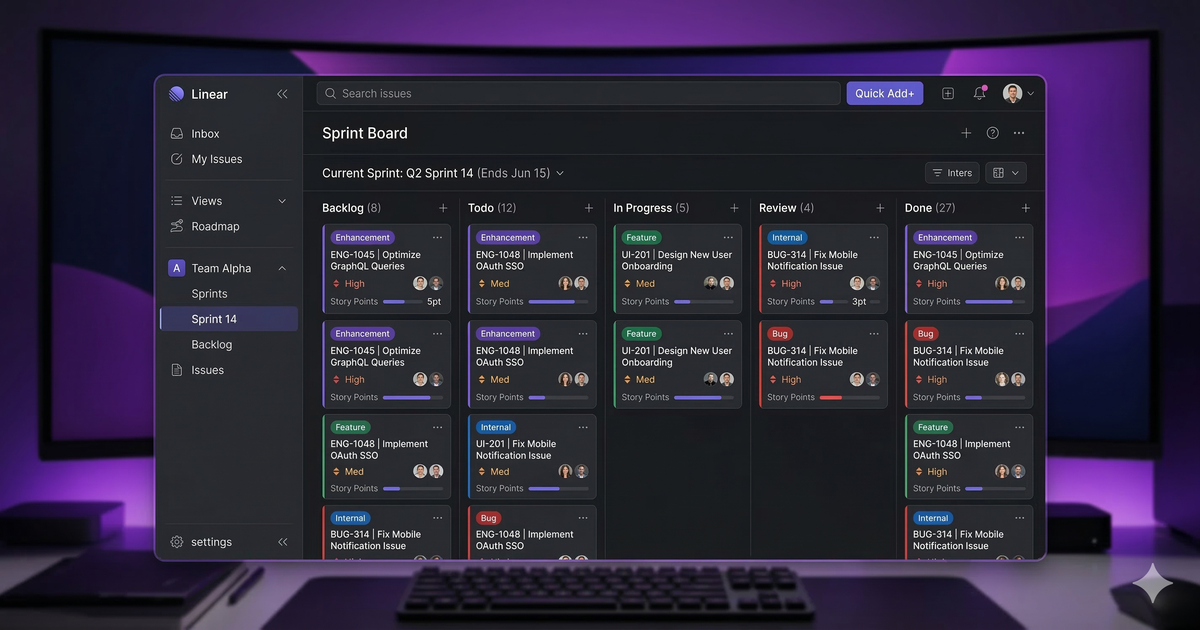
Linear has quietly become the issue tracker of choice for fast-moving engineering teams. While Jira dominates enterprise and Asana owns the marketing/ops space, Linear carved out its niche by being ridiculously fast, keyboard-driven, and opinionated about how software should be built.
After extensive testing, here’s our full review for 2026.
Quick Verdict
Linear is the best issue tracker for software development teams that value speed and focus. Its UI is lightning-fast, the keyboard shortcuts feel native, and the Git integration is seamless. However, it’s not built for non-technical teams — if you need marketing calendars, client-facing portals, or heavy customization, look elsewhere.
Rating: 4.7/5
Pricing
| Plan | Price | Key Features |
|---|---|---|
| Free | $0 | Unlimited issues, up to 250 members |
| Basic | $8/user/mo | Unlimited history, guest access |
| Business | $12/user/mo | Advanced integrations, SAML SSO |
| Enterprise | Custom | Audit logs, custom SLAs, dedicated support |
Linear’s free plan is remarkably generous — 250 members with unlimited issues is enough for most startups. The paid plans add enterprise features rather than gating core functionality.
What Makes Linear Special
Speed That Changes How You Work
Linear isn’t just “fast for a web app.” It’s fast in a way that fundamentally changes how you interact with it. Pages load instantly. Search results appear as you type. Dragging issues between statuses feels like a native desktop application.
This matters more than it sounds. When your issue tracker has zero friction, you actually use it. No more “I’ll update the ticket later” — because updating takes less than a second.
Keyboard-First Design
Almost everything in Linear can be done from the keyboard:
C— create new issueCtrl+K— command palette (search anything)S— set statusA— assignP— set priorityL— add label
Once you learn the shortcuts, you can triage an entire sprint backlog without touching the mouse. This is a huge productivity win for developers who live in the terminal.
Git Integration Done Right
Linear integrates deeply with GitHub, GitLab, and Bitbucket:
- Auto-linking: Reference a Linear issue ID in a commit or PR, and it links automatically
- Auto-status: When a PR is merged, the linked issue moves to “Done”
- Branch names: Linear generates branch names from issue titles (e.g.,
feat/lin-423-add-dark-mode) - PR descriptions: Auto-populated with issue details
This removes the manual overhead of keeping your issue tracker in sync with your codebase — a problem that plagues Jira users.
Cycles and Roadmaps
Linear uses Cycles (similar to sprints) and Projects (similar to epics) to organize work at a higher level. The Roadmap view gives leadership visibility into what’s shipping and when, without requiring engineers to maintain a separate project plan.
Where Linear Falls Short
Not Built for Non-Technical Teams
Linear is opinionated — and that opinion is “this tool is for software teams.” There are no:
- Custom field types (limited to labels and priorities)
- Gantt charts or timeline views
- Client-facing portals or request forms
- Marketing calendar views
- Heavy workflow customization
If your organization needs a single tool for engineering, marketing, and operations, you’ll still need something like Asana or ClickUp alongside Linear. For a broader view, see our comparison of Asana vs Monday — both are better suited for cross-functional teams.
Limited Reporting
Linear’s built-in analytics cover the basics (velocity, cycle burndown, issue throughput) but lack the depth of Jira’s reporting. If your managers need custom dashboards with dozens of widgets, Linear won’t satisfy them.
Smaller Integration Ecosystem
Linear integrates with the essentials (Slack, GitHub, GitLab, Figma, Sentry, Zendesk) but the total count is far smaller than Jira or Asana. You may need Zapier or Make to bridge gaps with niche tools.
Linear vs Jira
| Feature | Linear | Jira |
|---|---|---|
| Speed | ⚡ Instant | 🐌 Notoriously slow |
| Learning curve | Low | High |
| Customization | Minimal (opinionated) | Extremely flexible |
| Enterprise features | Growing | Mature |
| Price (50 users) | $400/mo | $387.50/mo |
| Best for | Startups, mid-size dev teams | Large enterprises, regulated industries |
Linear wins on speed and developer experience. Jira wins on customization and enterprise maturity. If your team has fewer than 200 engineers and no regulatory compliance requirements, Linear is almost certainly the better choice.
Linear vs Asana
Comparing Linear to Asana is a bit like comparing a scalpel to a Swiss Army knife. Linear does one thing (issue tracking for dev teams) extremely well. Asana does many things (project management across departments) pretty well.
If you’re evaluating general project management tools, our best project management tools roundup covers the full landscape.
Bottom line: Use Linear for engineering, Asana for everything else. Many companies run both.
Who Should Use Linear?
- Startup engineering teams (5-100 developers) that want speed over customization
- Teams migrating from Jira who are tired of slow load times and configuration complexity
- Keyboard-power-users who want to manage issues as fast as they write code
- Engineering leaders who want clean roadmap visibility without project management overhead
Who Should Skip Linear?
- Non-technical teams (marketing, sales, HR) — Linear isn’t designed for you
- Enterprises requiring heavy compliance — Jira’s audit trails and custom workflows are more mature
- Teams needing one tool for everyone — Linear is engineering-only by design
The Bottom Line
Linear is the best issue tracker for software development teams in 2026. Period. Its speed is unmatched, its Git integration is the best in class, and its opinionated design means less time configuring and more time building.
The trade-off is clear: you get a focused, fast, beautiful tool — but only for engineering. If that’s what you need, Linear is an easy recommendation.
Looking for alternatives? Check our best free project management tools or explore Notion alternatives for teams that need more flexibility. Visit our Linear alternatives page for a full list of comparable tools.