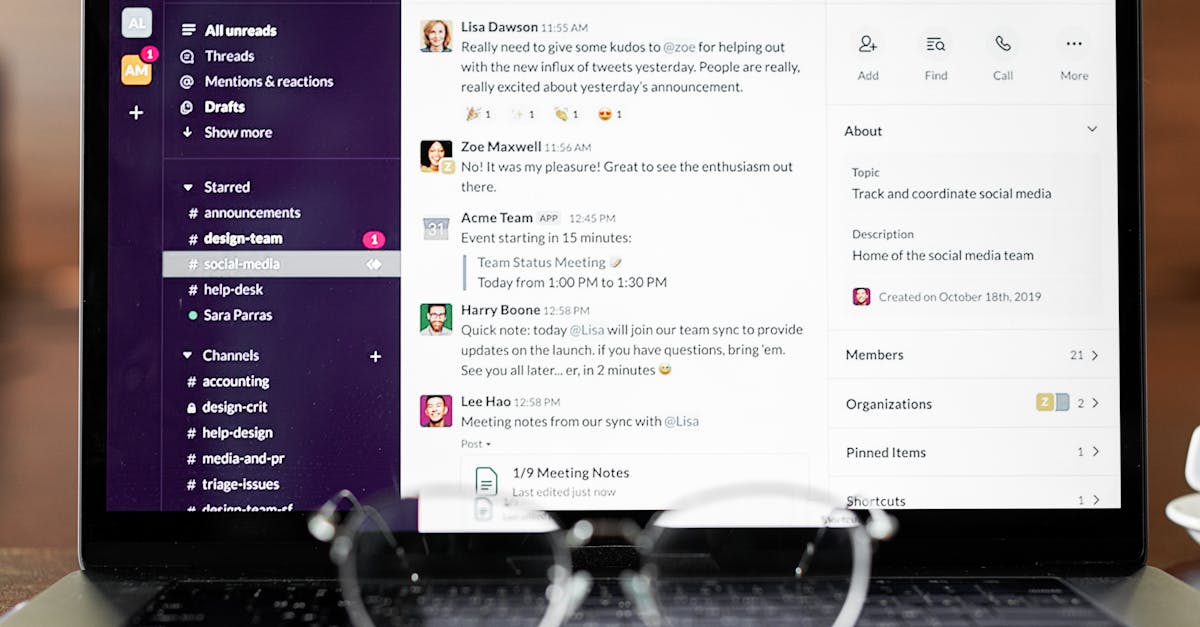
Slack is a popular software tool used by individuals and teams for productivity and collaboration. In this review, we evaluate its features, pricing, pros, cons, and alternatives for 2026.
Slack Review 2026: Still the Best Team Chat?
Slack has dominated the team communication space since 2013, but as we head deeper into 2026, the question persists: is Slack still the best option for modern teams? With competitors like Microsoft Teams, Discord, and emerging platforms reshaping how teams communicate, we’ve put Slack under the microscope to give you an honest review of whether it deserves a spot in your workplace toolstack.
This Slack review examines everything from pricing and features to real-world performance and whether it’s truly worth the investment for your organization.
What Is Slack?
Slack is a cloud-based business messaging platform designed for team communication and collaboration. Rather than relying on email for internal communications, Slack organizes conversations into channels, direct messages, and threads—allowing teams to have focused, searchable conversations that stay within the platform.
At its core, Slack functions as a centralized hub where teams can share files, discuss projects, integrate third-party tools, and maintain institutional knowledge. It’s particularly popular among software development teams, but has expanded into virtually every industry sector.
Slack Pricing Breakdown (2026)
Slack offers four pricing tiers:
Free Plan
- Limited to the 90 most recent messages
- Basic features: channels, direct messages, file sharing
- No integrations beyond basic functionality
- Best for: small teams testing Slack
Pro Plan ($7.25/user/month)
- Unlimited message history
- Full integrations access
- Priority support (9am-5pm local time)
- Best for: growing teams and small businesses
Business+ Plan ($15/user/month)
- Everything in Pro, plus advanced security
- Governance tools
- Granular permission controls
- Audit logs
- Best for: mid-size companies with compliance needs
Enterprise Grid (Custom pricing)
- Unlimited workspaces
- Advanced admin controls
- Dedicated infrastructure
- Priority support 24/7
- Best for: large enterprises
Compared to 2025 pricing, Slack has maintained relatively stable rates, though the value proposition has shifted with competition from Microsoft Teams (which is included in Microsoft 365 subscriptions).
Key Features That Stand Out
Channels System
Slack’s channel architecture remains one of its strongest assets. Organizing conversations by topic, project, or team allows for better signal-to-noise ratio and helps new team members onboard quickly. Public channels foster transparency, while private channels maintain confidentiality.
Huddles (Video/Audio Calls)
Introduced in recent years, Huddles allow spontaneous 1-on-1 or group calls without leaving Slack. They’ve become increasingly polished, offering screen sharing and recording capabilities—reducing the need for separate video conferencing tools.
Workflows
Slack Workflows automate repetitive tasks like collecting form submissions, sending reminders, or routing approvals. While powerful, they require some technical understanding to set up effectively.
2,600+ Integrations
Slack’s integration ecosystem is where it truly shines. From Salesforce and Jira to Google Drive and Asana, Slack connects with virtually every tool your team uses. This reduces context-switching and keeps information flowing seamlessly across your stack.
Search Functionality
Unlike email, Slack’s search is genuinely useful. You can find messages, files, and conversations across your entire workspace history, making Slack a valuable knowledge repository.
Pros: Why Teams Choose Slack
1. Excellent User Experience Slack’s interface is intuitive and visually polished. New users can jump in without extensive training.
2. Unbeatable Integrations 2,600+ apps mean Slack can integrate with almost anything you use. This is a significant advantage over competitors.
3. Channels Reduce Email Overload Teams that transition from email-heavy workflows report dramatically reduced inbox clutter.
4. Searchable Conversation History Unlike email, Slack conversations stay organized and discoverable, becoming an institutional knowledge base.
5. Strong Community & Resources Slack has extensive documentation, community forums, and third-party tools built around it.
Cons: Where Slack Falls Short
1. Message Limits on Free Plan Are Restrictive While 90 messages might be enough for testing, small teams quickly hit this ceiling. You’re effectively forced to upgrade.
2. Notification Overload By default, Slack sends notifications for everything. Teams often struggle with notification fatigue, especially when channels have high message volume.
3. Can Be Distracting The always-on nature of Slack can hurt deep work. Some organizations have implemented “No Slack hours” to combat this.
4. No Native Task Management While Slack Workflows exist, true task management requires integration with third-party tools like Asana or Monday.com.
5. Pricing Scales Quickly For large teams, per-user costs add up fast. A 100-person team on Business+ plan pays $1,500/month—roughly $18,000 annually.
6. Learning Curve for Advanced Features Workflows, Slack Apps, and custom integrations require technical knowledge. Non-technical teams may only scratch the surface.
Slack vs. The Competition
Slack vs. Microsoft Teams Teams is bundled with Microsoft 365, making it significantly cheaper for organizations already invested in Microsoft’s ecosystem. However, Teams’ interface is less polished, and its integration ecosystem is smaller. Slack vs Microsoft Teams covers this comparison in depth.
Slack vs. Discord Discord is free and excellent for communities but lacks enterprise features like audit logs, admin controls, and compliance tools. Best for gaming communities, not enterprises.
Slack vs. Google Chat Google Chat is free for Google Workspace users and integrates seamlessly with Google’s tools. However, it’s less feature-rich than Slack and has a smaller app ecosystem.
Best For
- Remote-first teams
- Development teams (especially those using GitHub, Jira, and similar tools)
- Distributed organizations
- Companies prioritizing searchable communication history
- Teams needing 2,600+ integrations
- Organizations with compliance requirements (Enterprise Grid)
Not Ideal For
- Organizations already deeply invested in Microsoft 365
- Budget-constrained teams (free plan has severe limits)
- Companies requiring advanced built-in task management
- Organizations looking for offline communication capabilities
The Verdict: Is Slack Still the Best?
Rating: 4.4/5
Slack remains one of the best team communication platforms in 2026, but it’s no longer a no-brainer choice for every organization. The competitive landscape has matured significantly.
Slack is worth it if:
- Your team’s workflow revolves around integrations (GitHub, Jira, Salesforce, etc.)
- You need searchable, organized conversation history
- You’re willing to pay for premium tiers
- You prioritize user experience and polish
- You have 10+ team members (Pro plan becomes cost-effective)
Consider alternatives if:
- Your team is already Microsoft 365 users (Teams is included)
- Budget is your primary constraint
- You need advanced task management built-in
- You’re a very small team that won’t hit Free plan limits
The Bottom Line
In 2026, Slack’s dominance is less absolute, but its quality is undeniable. For teams that depend on integrations and value excellent user experience, Slack remains the gold standard. However, Microsoft Teams has closed the gap significantly, and smaller organizations might find better value elsewhere.
The question isn’t whether Slack is the best team chat anymore—it’s whether Slack is the best fit for your team. For most growing organizations with multiple integrations, the answer is yes.
See how Slack compares → Slack vs Microsoft Teams
Looking for alternatives? Check out Best Slack Alternatives
Frequently Asked Questions
Is Slack worth it in 2026?
Slack remains a strong option for its target use case. See our detailed pros and cons analysis above to decide if it fits your specific needs.
What is the best free alternative to Slack?
Several tools offer similar functionality for free. Check the alternatives section above for the best free options available in 2026.
How much does Slack cost?
See the pricing table above for Slack’s current plans, including the free tier and all paid options.